
 observerElementMutation【监听dom元素属性变化】 🔥
描述
监听 dom 元素属性变化,支持回调函数处理,例如宽度、高度、class 类变化 等等
# 1.示例
复制代码
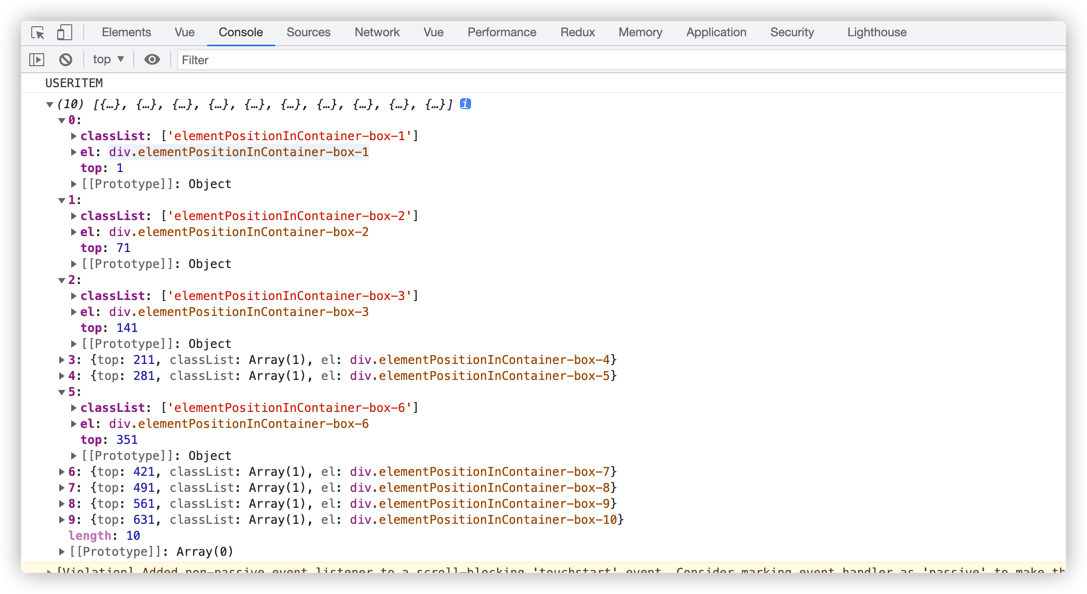
# 打印结果:
# 2.入参说明
# 主参数
| 参数 | 说明 | 类型 | 是否必填 | 默认值 |
|---|---|---|---|---|
| callback | 监听变化后,要执行自定义的回调函数 | Function | - | - |
| options | 选项, 详情查看 👇 | Object | - | - |
# options 说明
| 参数 | 说明 | 类型 | 是否必填 | 默认值 |
|---|---|---|---|---|
| el | 监听目标的 dom 元素 | HtmlElement | - | - |
| attribute | 监听的属性集合 | Array<String> | - | - |
| observerOptions | 一个可选的 MutationObserverInit (opens new window) 对象 | Object | - | - |
# 实例对象方法
| 参数 | 说明 | 类型 | 是否必填 | 默认值 |
|---|---|---|---|---|
| init | 初始化 | Function | - | - |
| forceUpdate | 强制执行,刷新 | Function | - | - |
| start | 开始监听 | Function | - | - |
| end | 结束监听 | Function | - | - |
# 3.源码
源码,点开查看 👈
import debounce from '../base/debounce'
import getStyle from './getStyle'
import { _MutationObserver } from './_constant'

/**
 * 监听元素属性变化,例如宽度、高度
 * @param {Function} callback
 * @param {Object} options
 * @returns {*}
 */
function observerElementMutation({
  callback = () => {},
  options = {
    el: null,
    attribute: ['height'],
    observerOptions: {
      attributes: true,
      childLIst: true,
      attributeOldValue: true,
      subtree: true
    }
  }
}) {
  observerElementMutation.fn = observerElementMutation.prototype = {
    start() {
      if (!this.observer) {
        // console.error('[warning] 缺少初始化参数')
        this.init()
      }
      this.observer.observe(this.defaultOptions.el, this.defaultOptions.observerOptions)
      return this
    },
    forceUpdate() {
      Object.keys(this.recordOldValue).forEach(v => {
        this.recordOldValue[v] = getStyle(this.defaultOptions.el, v)
      })
      callback.apply(this, arguments)
      return this
    },
    end() {
      if (this.observer) {
        console.warn('[end] 卸载监听成功')
        this.observer.disconnect()
        this.observer.takeRecords()
        this.observer = null
      }
      return this
    },
    init() {
      this.defaultOptions = {
        el: null,
        attribute: ['height'],
        ...options,
        observerOptions: {
          attributes: true,
          childLIst: true,
          attributeOldValue: true,
          subtree: true,
          ...(options.observerOptions || {})
        }
      }
      this.recordOldValue = this.defaultOptions.attribute.reduce((pre, cur) => {
        if (cur) pre[cur] = null
        return pre
      }, {})
      const observerCallback = mutationList => {
        if (
          Object.keys(this.recordOldValue).every(v => {
            if (this.recordOldValue[v] !== getStyle(this.defaultOptions.el, v)) {
              this.recordOldValue[v] = getStyle(this.defaultOptions.el, v)
              return false
            }
            return true
          })
        )
          return
        callback.apply(this, arguments)
      }
      const debounceDivResizeHandler = debounce(observerCallback.bind(this), 300)
      this.observer = new _MutationObserver(debounceDivResizeHandler)
      return this
    }
  }
  observerElementMutation.fn.init.prototype = observerElementMutation.fn
  return new observerElementMutation.fn.init()
}
1
2
3
4
5
6
7
8
9
10
11
12
13
14
15
16
17
18
19
20
21
22
23
24
25
26
27
28
29
30
31
32
33
34
35
36
37
38
39
40
41
42
43
44
45
46
47
48
49
50
51
52
53
54
55
56
57
58
59
60
61
62
63
64
65
66
67
68
69
70
71
72
73
74
75
76
77
78
79
80
81
82
83
84
85
86
2
3
4
5
6
7
8
9
10
11
12
13
14
15
16
17
18
19
20
21
22
23
24
25
26
27
28
29
30
31
32
33
34
35
36
37
38
39
40
41
42
43
44
45
46
47
48
49
50
51
52
53
54
55
56
57
58
59
60
61
62
63
64
65
66
67
68
69
70
71
72
73
74
75
76
77
78
79
80
81
82
83
84
85
86
上次更新: 2025/07/01, 14:52:29