
 domUtils【dom方法操作基础】 🔥
描述
对浏览器自带的 dom 方法二次封装
# 1.示例
# 1.1 RGBToHex(rgb) 将 RGB 值转换为十六进制颜色代码。
import { domUtils } from 'sf-utils2'

domUtils.RGBToHex(`rgba('255, 165, 1')`) // '#ffa501'
1
2
3
2
3
# 1.2 RGBToHex(rgb) 则将颜色代码转换为 rgb()
domUtils.hexToRGB(`#ffa501`, 0.2) // rgba(255,165,1,0.2)
1
# 1.2.1 hexToRgba(hex = '', opacity) 则将颜色代码转换为 rgb()
domUtils.hexToRgba(`#ffa501`) // rgba(255, 165, 1)
1
# 1.3 getStyle(node, styleName) 获取最新的 style 值
domUtils.getStyle(document.body, 'background-color') // rgb(140, 140, 140)
1
# 1.4 setStyles(element, styles) 设置元素节点多个 style 属性
// 给body 设置多个style属性, 属性名可以支持 小驼峰命名 也可以使用原始的横线连接
domUtils.setStyles(document.body, { 'background-color': '#eee', display: 'flex', textAlign: 'center' })
// 查看控制台节点 <body style="background-color: rgb(238, 238, 238); display: flex; text-align: center;">...</body>
1
2
3
2
3
# 1.5 removeStyles(element, styleNames) 移除元素节点多个 style 属性
// 给body 移除多个style属性, 属性名可以支持 小驼峰命名 也可以使用原始的横线连接
domUtils.removeStyles(document.body, ['backgroundColor', 'display', 'textAlign'])
// 查看控制台节点 <body>...</body>
1
2
3
2
3
# 1.6 setAttributes(element, attrs) 设置元素节点多个属性
// 给body 设置多个attribute属性
domUtils.setAttributes(document.body, { 'cache-id': Date.now().toString(), name: 'bianpengfei' })
// 查看控制台节点 <body style="background-color: rgb(238, 238, 238); display: flex; text-align: center;" cache-id="1657464805578" name="bianpengfei">...</body>
1
2
3
2
3
# 1.7 removeAttributes(element, attrNames) 删除元素节点多个属性
// 给body 移除多个attribute属性
domUtils.removeAttribute(document.body, ['cache-id', 'name'])
1
2
2
# 1.8 removeAllAttributes(element, exclude) 移除所有属性
domUtils.removeAllAttributes(document.body, ['cache-id', 'name']) // 移除body 除了cache-id和name之外的属性

domUtils.removeAllAttributes(document.body) // 移除了body所有属性
1
2
3
2
3
# 1.9 getAttribute(element, attrName) 获取属性名
domUtils.getAttribute(document.body, 'cache-id') // 1657464805578
1
# 1.10 addClasses(ele, classNames) 批量添加 className
domUtils.addClasses(document.body, ['flex', 'justify-center', 'items-center']) // <body class="flex justify-center items-center">...</body>
1
# 1.11 removeClasses(ele, classNames) 批量移除 classNames
domUtils.addClasses(document.body, ['flex', 'justify-center']) // <body class="items-center">...</body>
domUtils.removeClasses(document.body, ['flex', 'justify-center', 'items-center']) // <body>...</body>
1
2
2
# 1.12 isZeroWidthNode(node) 判断是否是零宽字符
domUtils.isZeroWidthNode(document.body) // false
1
# 1.13 getTagName(ele) 获取标签名
domUtils.getTagName(document.body) // body
1
# 1.14 unHtml(str, reg) 将 str 中的 html 符号转义,将转义“',&,<,",>”五个字符
let html = '<body>&</body>'
console.log(domUtils.unhtml(html)) // output: <body>&</body>
1
2
2
# 1.15 getDpi() 获取 dpi
domUtils.getDpi() // [96, 96] tip 这里表示横向是96 纵向是96
1
# 1.16 cmToPx(cm) cm 转成 px
domUtils.cmToPx(10) // 37.795275590551185
domUtils.cmToPx(1.12) // 4.233070866141733
domUtils.cmToPx(101.22) // 382.56377952755906
1
2
3
2
3
# 1.17 pxToCm(px) px 转成 cm
domUtils.pxToCm(37) // 9.789583333333333
domUtils.pxToCm(4.23) // 1.1191875
domUtils.pxToCm(382.56) // 101.219
1
2
3
2
3
# 1.18 serializeForm(form) 将一组表单元素编码为查询字符串
serializeForm(document.querySelector('#form')) // email=test%40email.com&name=Test%20Name
1
# 1.19 eventBus() 使用、和方法创建一个发布/订阅(发布-订阅)事件中心
注意
该方法已从 3.0.14+ 后迁移到了_helpEventBus 文件中,
名称由 eventBus 更名为 _helpEventBus
// ⚠️ 该方法已从3.0.14+后迁移到了_helpEventBus文件中
import { _helpEventBus } from 'sf-utils2'

const handler = data => console.log(data)
const hub = _helpEventBus() // 创建事件总线
const effects = [] // 事件副作用
let increment = 0

// 订阅: listen for different types of events
hub.on('message', handler)
hub.on('message', () => console.log('Message event fired'))
hub.on('increment', () => increment++)
effects.push(hub.on('message', () => console.log('Message event effcts')))

// 发布事件: emit events to invoke all handlers subscribed to them, passing the data to them as an argument
hub.emit('message', 'hello world') // logs 'hello world' and 'Message event fired'
hub.emit('message', { hello: 'world' }) // logs the object and 'Message event fired'
hub.emit('increment') // `increment` variable is now 1

// 取消订阅: stop a specific handler from listening to the 'message' event
hub.off('message', handler)

// 清除所有副作用,主要为了防止使用者忘记销毁事件订阅,导致内存泄漏
hub.clearEffects(effects)
1
2
3
4
5
6
7
8
9
10
11
12
13
14
15
16
17
18
19
20
21
22
23
24
2
3
4
5
6
7
8
9
10
11
12
13
14
15
16
17
18
19
20
21
22
23
24
# 1.20 euclideanDistance(a, b) 计算任意维数中两点之间的距离
domUtils.euclideanDistance([1, 1], [2, 3]) // ~2.2361
domUtils.euclideanDistance([1, 1, 1], [2, 3, 2]) // ~2.4495
1
2
2
# 1.21 blobToBase64Sync(blob) blob 转成 base64
// tip 这里的blob是js中的blob二进制流数据
domUtils.blobToBase64Sync(blob) //
1
2
2
# 1.22 readTextContent(file) 读取 file 文件内容
// tip 这里的blob是js中的blob二进制流数据
domUtils.readTextContent(file) //
1
2
2
# 1.23 removeNode(node, keepChildren = false) 删除节点 node,并根据 keepChildren 的值决定是否保留子节点
<div id="test">
  <div id="child">你好</div>
</div>
<script>
  domUtils.removeNode(document.body, true)
  //output: true
  console.log(document.getElementById('child') !== null)
</script>
1
2
3
4
5
6
7
8
2
3
4
5
6
7
8
# 1.23 getTableIndexList(table) 获取 table 位置信息
示例查看 👈
<table cellspacing="0" cellpadding="0" style="width: 100%">
  <tr>
    <td colspan="2">1</td>
    <td>3</td>
    <td>4</td>
    <td>5</td>
    <td>6</td>
  </tr>
  <tr>
    <td>1</td>
    <td rowspan="2">2</td>
    <td>3</td>
    <td>4</td>
    <td>5</td>
    <td>6</td>
  </tr>
  <tr>
    <td>1</td>
    <td>3</td>
    <td>4</td>
    <td>5</td>
    <td>6</td>
  </tr>
  <tr>
    <td>1</td>
    <td>2</td>
    <td>3</td>
    <td>4</td>
    <td>5</td>
    <td>6</td>
  </tr>
</table>

<script>
  domUtils.getTableIndexList(document.body, true)

  // output:

  // [
  //   {
  //       rowIndex: 0,  // 行索引(合并后的)⚠️一般来说,我们会判断 行索引和当前数组索引对比,是属于当前行
  //       cellIndex: 0, // 列索引(合并后的)就是td.cellIndex
  //       colIndex: 0, // 列真实的索引值
  //       rowSpan: 1,  // 跨行数
  //       colSpan: 2 // 跨列数
  //   },
  //     { rowIndex: 0, cellIndex: 0, colIndex: 0, rowSpan: 1, colSpan: 2 },
  //     { rowIndex: 0, cellIndex: 1, colIndex: 2, rowSpan: 1, colSpan: 1 },
  //     { rowIndex: 0, cellIndex: 2, colIndex: 3, rowSpan: 1, colSpan: 1 },
  //     { rowIndex: 0, cellIndex: 3, colIndex: 4, rowSpan: 1, colSpan: 1 },
  //     { rowIndex: 0, cellIndex: 4, colIndex: 5, rowSpan: 1, colSpan: 1 }
  //   ],
  //   [
  //     { rowIndex: 1, cellIndex: 0, colIndex: 0, rowSpan: 1, colSpan: 1 },
  //     { rowIndex: 1, cellIndex: 1, colIndex: 1, rowSpan: 2, colSpan: 1 },
  //     { rowIndex: 1, cellIndex: 2, colIndex: 2, rowSpan: 1, colSpan: 1 },
  //     { rowIndex: 1, cellIndex: 3, colIndex: 3, rowSpan: 1, colSpan: 1 },
  //     { rowIndex: 1, cellIndex: 4, colIndex: 4, rowSpan: 1, colSpan: 1 },
  //     { rowIndex: 1, cellIndex: 5, colIndex: 5, rowSpan: 1, colSpan: 1 }
  //   ],
  //   [
  //     { rowIndex: 2, cellIndex: 0, colIndex: 0, rowSpan: 1, colSpan: 1 },
  //     { rowIndex: 1, cellIndex: 1, colIndex: 1, rowSpan: 2, colSpan: 1 },
  //     { rowIndex: 2, cellIndex: 1, colIndex: 2, rowSpan: 1, colSpan: 1 },
  //     { rowIndex: 2, cellIndex: 2, colIndex: 3, rowSpan: 1, colSpan: 1 },
  //     { rowIndex: 2, cellIndex: 3, colIndex: 4, rowSpan: 1, colSpan: 1 },
  //     { rowIndex: 2, cellIndex: 4, colIndex: 5, rowSpan: 1, colSpan: 1 }
  //   ],
  //   [
  //     { rowIndex: 3, cellIndex: 0, colIndex: 0, rowSpan: 1, colSpan: 1 },
  //     { rowIndex: 3, cellIndex: 1, colIndex: 1, rowSpan: 1, colSpan: 1 },
  //     { rowIndex: 3, cellIndex: 2, colIndex: 2, rowSpan: 1, colSpan: 1 },
  //     { rowIndex: 3, cellIndex: 3, colIndex: 3, rowSpan: 1, colSpan: 1 },
  //     { rowIndex: 3, cellIndex: 4, colIndex: 4, rowSpan: 1, colSpan: 1 },
  //     { rowIndex: 3, cellIndex: 5, colIndex: 5, rowSpan: 1, colSpan: 1 }
  //   ]
  // ]
</script>
1
2
3
4
5
6
7
8
9
10
11
12
13
14
15
16
17
18
19
20
21
22
23
24
25
26
27
28
29
30
31
32
33
34
35
36
37
38
39
40
41
42
43
44
45
46
47
48
49
50
51
52
53
54
55
56
57
58
59
60
61
62
63
64
65
66
67
68
69
70
71
72
73
74
75
76
77
78
2
3
4
5
6
7
8
9
10
11
12
13
14
15
16
17
18
19
20
21
22
23
24
25
26
27
28
29
30
31
32
33
34
35
36
37
38
39
40
41
42
43
44
45
46
47
48
49
50
51
52
53
54
55
56
57
58
59
60
61
62
63
64
65
66
67
68
69
70
71
72
73
74
75
76
77
78
输出图片结果
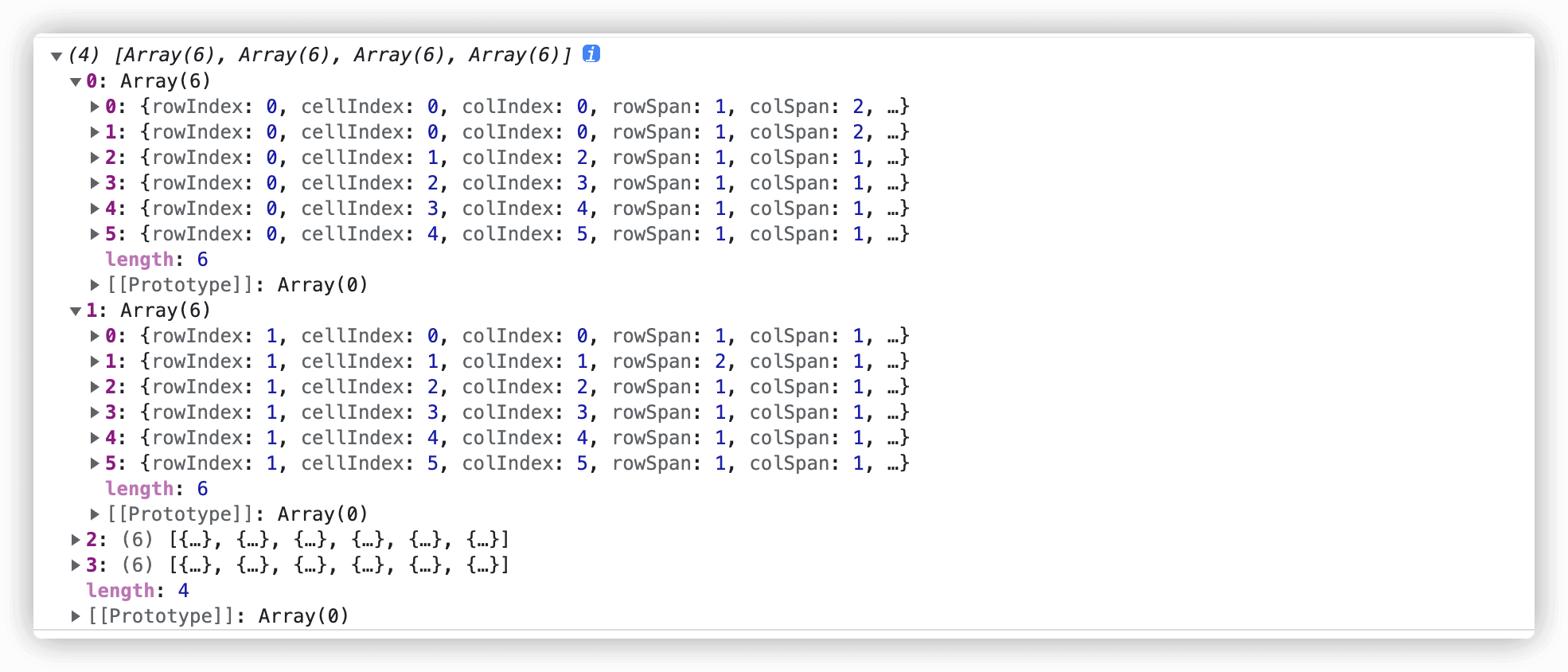
# 1.24 getTableIndexListPro(table) 对 getTableIndexList 进行二次封装
示例查看 👈
<table cellspacing="0" cellpadding="0" style="width: 100%">
  <tr>
    <td colspan="2">1</td>
    <td>3</td>
    <td>4</td>
    <td>5</td>
    <td>6</td>
  </tr>
  <tr>
    <td>1</td>
    <td rowspan="2">2</td>
    <td>3</td>
    <td>4</td>
    <td>5</td>
    <td>6</td>
  </tr>
  <tr>
    <td>1</td>
    <td>3</td>
    <td>4</td>
    <td>5</td>
    <td>6</td>
  </tr>
  <tr>
    <td>1</td>
    <td>2</td>
    <td>3</td>
    <td>4</td>
    <td>5</td>
    <td>6</td>
  </tr>
</table>

<script>
  domUtils.getTableIndexListPro(document.querySelector('table'))
  // output
  // [
  //   [
  //     {
  //       rowIndex: 0,   // 行索引(合并后的)⚠️一般来说,我们会判断 行索引和当前数组索引对比,是属于当前行
  //       cellIndex: 0,  // 列索引(合并后的)就是td.cellIndex
  //       colIndex: 0,   // 列真实的索引值
  //       rowSpan: 1,    // 跨行数
  //       colSpan: 2,   // 跨列数
  //       rMin: 0,      // 当前每一项td 最小rowIndex
  //       rMax: 0,     // 当前每一项td 最大rowIndex
  //       cMin: 0,      // 当前每一项td 最大colIndex
  //       cMax: 1,      // 当前每一项td 最大colIndex
  //       rIndex: 0,     // 和rowIndex等价
  //       cIndex: 0,     // 和colIndex等价
  //       part: true,    // 是否属于当前行
  //       trEle: {},   // tr dom节点
  //       tdEle: {},   // td 都节点
  //       index: 0    // 数组索引
  //     },
  //     {rowIndex:0,cellIndex:0,colIndex:0,rowSpan:1,colSpan:2,rMin:0,rMax:0,cMin:0,cMax:1,rIndex:0,cIndex:0,part:true,trEle:{},tdEle:{},index:1},
  //     {rowIndex:0,cellIndex:1,colIndex:2,rowSpan:1,colSpan:1,rMin:0,rMax:0,cMin:2,cMax:2,rIndex:0,cIndex:1,part:true,trEle:{},tdEle:{},index:2},
  //     {rowIndex:0,cellIndex:2,colIndex:3,rowSpan:1,colSpan:1,rMin:0,rMax:0,cMin:3,cMax:3,rIndex:0,cIndex:2,part:true,trEle:{},tdEle:{},index:3},
  //     {rowIndex:0,cellIndex:3,colIndex:4,rowSpan:1,colSpan:1,rMin:0,rMax:0,cMin:4,cMax:4,rIndex:0,cIndex:3,part:true,trEle:{},tdEle:{},index:4},
  //     {rowIndex:0,cellIndex:4,colIndex:5,rowSpan:1,colSpan:1,rMin:0,rMax:0,cMin:5,cMax:5,rIndex:0,cIndex:4,part:true,trEle:{},tdEle:{},index:5}],
  //   [
  //     {rowIndex:1,cellIndex:0,colIndex:0,rowSpan:1,colSpan:1,rMin:1,rMax:1,cMin:0,cMax:0,rIndex:1,cIndex:0,part:true,trEle:{},tdEle:{},index:0},
  //     {rowIndex:1,cellIndex:1,colIndex:1,rowSpan:2,colSpan:1,rMin:1,rMax:2,cMin:1,cMax:1,rIndex:1,cIndex:1,part:true,trEle:{},tdEle:{},index:1},
  //     {rowIndex:1,cellIndex:2,colIndex:2,rowSpan:1,colSpan:1,rMin:1,rMax:1,cMin:2,cMax:2,rIndex:1,cIndex:2,part:true,trEle:{},tdEle:{},index:2},
  //     {rowIndex:1,cellIndex:3,colIndex:3,rowSpan:1,colSpan:1,rMin:1,rMax:1,cMin:3,cMax:3,rIndex:1,cIndex:3,part:true,trEle:{},tdEle:{},index:3},
  //     {rowIndex:1,cellIndex:4,colIndex:4,rowSpan:1,colSpan:1,rMin:1,rMax:1,cMin:4,cMax:4,rIndex:1,cIndex:4,part:true,trEle:{},tdEle:{},index:4},
  //     {rowIndex:1,cellIndex:5,colIndex:5,rowSpan:1,colSpan:1,rMin:1,rMax:1,cMin:5,cMax:5,rIndex:1,cIndex:5,part:true,trEle:{},tdEle:{},index:5}
  //   ],
  //   [
  //     {rowIndex:2,cellIndex:0,colIndex:0,rowSpan:1,colSpan:1,rMin:2,rMax:2,cMin:0,cMax:0,rIndex:2,cIndex:0,part:true,trEle:{},tdEle:{},index:0},
  //     {rowIndex:1,cellIndex:1,colIndex:1,rowSpan:2,colSpan:1,rMin:1,rMax:2,cMin:1,cMax:1,rIndex:1,cIndex:1,part:false,trEle:{},tdEle:{},index:1},
  //     {rowIndex:2,cellIndex:1,colIndex:2,rowSpan:1,colSpan:1,rMin:2,rMax:2,cMin:2,cMax:2,rIndex:2,cIndex:1,part:true,trEle:{},tdEle:{},index:2},
  //     {rowIndex:2,cellIndex:2,colIndex:3,rowSpan:1,colSpan:1,rMin:2,rMax:2,cMin:3,cMax:3,rIndex:2,cIndex:2,part:true,trEle:{},tdEle:{},index:3},
  //     {rowIndex:2,cellIndex:3,colIndex:4,rowSpan:1,colSpan:1,rMin:2,rMax:2,cMin:4,cMax:4,rIndex:2,cIndex:3,part:true,trEle:{},tdEle:{},index:4},
  //     {rowIndex:2,cellIndex:4,colIndex:5,rowSpan:1,colSpan:1,rMin:2,rMax:2,cMin:5,cMax:5,rIndex:2,cIndex:4,part:true,trEle:{},tdEle:{},index:5}],
  //   [
  //     {rowIndex:3,cellIndex:0,colIndex:0,rowSpan:1,colSpan:1,rMin:3,rMax:3,cMin:0,cMax:0,rIndex:3,cIndex:0,part:true,trEle:{},tdEle:{},index:0},
  //     {rowIndex:3,cellIndex:1,colIndex:1,rowSpan:1,colSpan:1,rMin:3,rMax:3,cMin:1,cMax:1,rIndex:3,cIndex:1,part:true,trEle:{},tdEle:{},index:1},
  //     {rowIndex:3,cellIndex:2,colIndex:2,rowSpan:1,colSpan:1,rMin:3,rMax:3,cMin:2,cMax:2,rIndex:3,cIndex:2,part:true,trEle:{},tdEle:{},index:2},
  //     {rowIndex:3,cellIndex:3,colIndex:3,rowSpan:1,colSpan:1,rMin:3,rMax:3,cMin:3,cMax:3,rIndex:3,cIndex:3,part:true,trEle:{},tdEle:{},index:3},
  //     {rowIndex:3,cellIndex:4,colIndex:4,rowSpan:1,colSpan:1,rMin:3,rMax:3,cMin:4,cMax:4,rIndex:3,cIndex:4,part:true,trEle:{},tdEle:{},index:4},
  //     {rowIndex:3,cellIndex:5,colIndex:5,rowSpan:1,colSpan:1,rMin:3,rMax:3,cMin:5,cMax:5,rIndex:3,cIndex:5,part:true,trEle:{},tdEle:{},index:5}
  //   ]
  // ]
</script>
1
2
3
4
5
6
7
8
9
10
11
12
13
14
15
16
17
18
19
20
21
22
23
24
25
26
27
28
29
30
31
32
33
34
35
36
37
38
39
40
41
42
43
44
45
46
47
48
49
50
51
52
53
54
55
56
57
58
59
60
61
62
63
64
65
66
67
68
69
70
71
72
73
74
75
76
77
78
79
80
81
82
83
84
85
2
3
4
5
6
7
8
9
10
11
12
13
14
15
16
17
18
19
20
21
22
23
24
25
26
27
28
29
30
31
32
33
34
35
36
37
38
39
40
41
42
43
44
45
46
47
48
49
50
51
52
53
54
55
56
57
58
59
60
61
62
63
64
65
66
67
68
69
70
71
72
73
74
75
76
77
78
79
80
81
82
83
84
85
# 1.25 compareNodePosition(nodeA, nodeB) 比较 NodeA 和 NodeB 的位置
<body>
  <div id="A">
    <div id="A-A"></div>
  </div>
  <div id="B"></div>
  <div id="C"></div>
</body>

<script type="module">
  import { domUtils } from 'sf-utils2'
  console.log(domUtils.compareNodePosition(document.querySelector('#C'), document.querySelector('#B'))) // 2
  console.log(domUtils.compareNodePosition(document.querySelector('#C'), document.querySelector('#B'))) // 2
  console.log(domUtils.compareNodePosition(document.querySelector('#A'), document.querySelector('#B'))) // 4
  console.log(domUtils.compareNodePosition(document.querySelector('#A'), document.querySelector('body'))) // 8
  console.log(domUtils.compareNodePosition(document.querySelector('#A'), document.querySelector('#A-A'))) // 16
</script>
1
2
3
4
5
6
7
8
9
10
11
12
13
14
15
16
2
3
4
5
6
7
8
9
10
11
12
13
14
15
16
输出图片结果
# 3.源码
源码,点开查看 👈
上次更新: 2025/07/01, 14:52:29