sf-utils2 sf-utils2
版本v3.3.3-beta1
首页
  • 01.快速开始 🔥
  • 02.基础-Base
  • 03.对象-Object
  • 04.数组-Array
  • 05.方法-Function
  • 06.字符串-String
  • 07.数学-Math
  • 08.dom
  • 09.拓展
  • webpack5.x教程学习 (opens new window)
  • 例子
  • 教程 🔥
  • 例子配置
企业级后台模版 (opens new window)
版本v3.3.3-beta1
首页
  • 01.快速开始 🔥
  • 02.基础-Base
  • 03.对象-Object
  • 04.数组-Array
  • 05.方法-Function
  • 06.字符串-String
  • 07.数学-Math
  • 08.dom
  • 09.拓展
  • webpack5.x教程学习 (opens new window)
  • 例子
  • 教程 🔥
  • 例子配置
企业级后台模版 (opens new window)
  • 快速开始

  • 基础-Base

  • 对象-Object

  • 数组-Array✨✨✨

  • 方法-Function

  • 字符串-String

  • 数学-Math

  • 文件-Buffer

  • 节点-dom

    • 序言 👏
    • _constant
    • getHttpBlob【获取远程二进制数据流】
    • downloadFile【http下载文件】
    • loadJsSync【单个加载js文件】
    • loadJsOrCssMulSync【批量加载远程css和js文件】
    • getAbsOffsetTop【距离父滚动区域顶部绝对距离】 🔥
      • 1.示例
        • 说明:
      • 2.入参说明
      • 3.源码
    • getParentScrollElement【获取父元素滚动元素】 🔥
    • isScroll【是否是滚动容器】
    • scrollToX【水平滚动到某个具体位置】 🔥
    • scrollToY【垂直滚动到某个具体位置】 🔥
    • scrollToElement【滚动到某个dom元素】 🔥
    • isElementInContainer【元素是否整体在容器内】
    • batchElsPosInContainer【批量 dom 元素在 父的滚动视图位置】 🔥
    • isElementVisibleInViewport【是否可见在某个股东元素上】 🔥
    • observerElementMutation【监听dom元素属性变化】 🔥
    • print【打印】 🔥
    • partialCb【分片加载】
    • domUtils【dom方法操作基础】 🔥
  • 拓展

  • nodejs

目录

getAbsOffsetTop【距离父滚动区域顶部绝对距离】 🔥

描述

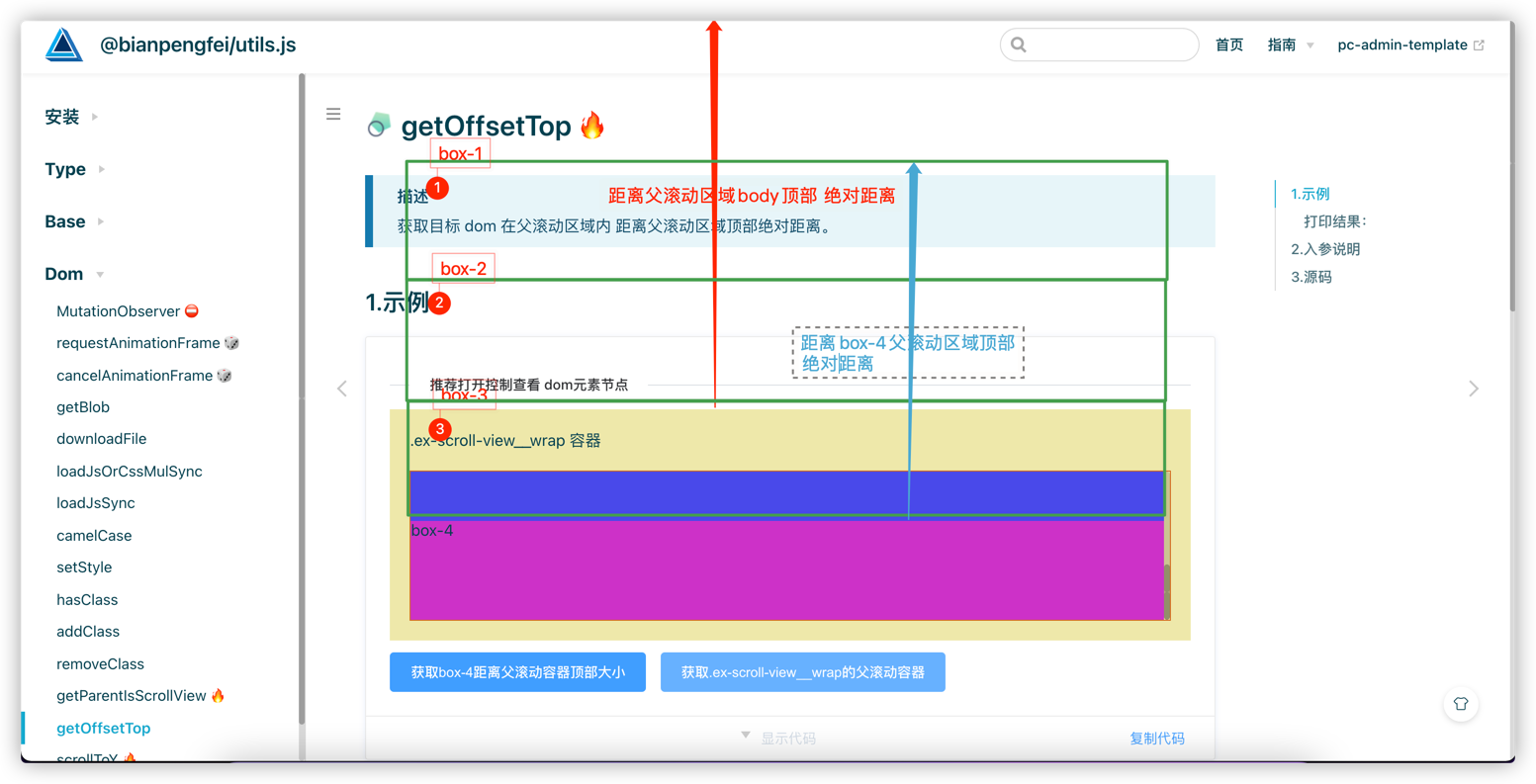
获取目标 dom 在父滚动区域内 距离父滚动区域顶部绝对距离。

# 1.示例

推荐打开控制查看 dom元素节点
.ex-scroll-view__wrap 容器
box-1
box-2
box-3
box-4
获取box-4距离父滚动容器顶部大小 获取.ex-scroll-view__wrap的父滚动容器距离顶部大小
<template>
  <div>
    <el-divider content-position="left">推荐打开控制查看 dom元素节点</el-divider>

    <div class="ex-scroll-view__wrap" style="background: palegoldenrod">
      <div style="padding: 20px 0">.ex-scroll-view__wrap 容器</div>
      <div class="ex-scroll-view">
        <div class="box-1" style="background: #dcbaba; height: 100px">box-1</div>
        <div class="box-2" style="background: #adad55; height: 100px">box-2</div>
        <div style="background: #4949ea; height: 100px">box-3</div>
        <div class="box-4" style="background: #cd2ec8; height: 100px">box-4</div>
      </div>
    </div>

    <div style="margin-top: 12px">
      <el-button type="primary" @click="getParentScrollTop('.ex-scroll-view .box-4', $event)"
        >获取box-4距离父滚动容器顶部大小</el-button
      >
      <el-button type="primary" @click="getParentScrollTop('.ex-scroll-view__wrap', $event)"
        >获取.ex-scroll-view__wrap的父滚动容器距离顶部大小</el-button
      >
    </div>
  </div>
</template>

<script>
import { getParentScrollElement, getAbsOffsetTop } from 'sf-utils2'

export default {
  methods: {
    getParentScrollTop(cls, event) {
      const targetDom = document.querySelector(cls)
      const scrollDom = getParentScrollElement(targetDom)
      alert(`${event.target.innerText}:${getAbsOffsetTop(targetDom, scrollDom, 0)}px`)
    }
  }
}
</script>

<style>

.ex-scroll-view__wrap {
  padding: 0 20px 20px;
}
.ex-scroll-view {
  overflow-y: auto;
  overflow-x: auto;
  height: 150px;
  border: 1px solid chocolate;
}

</style>
1
2
3
4
5
6
7
8
9
10
11
12
13
14
15
16
17
18
19
20
21
22
23
24
25
26
27
28
29
30
31
32
33
34
35
36
37
38
39
40
41
42
43
44
45
46
47
48
49
50
51
52
显示代码 复制代码 复制代码

# 说明:


# 2.入参说明

参数 说明 类型 是否必填 默认值
el 目标 dom 元素 HTMLElement
String
- -
elWrap 目标 dom 元素最近的父滚动容器 DomElement
String
- -
offsetTop 自定义的偏移量 Number - -

# 3.源码

源码,点开查看 👈
/**
 * 获取dom在滚动区域绝对位置top
 * @param el dom节点属性(id、class)或 目标dom元素
 * @param elWrap 滚动dom节点
 * @param offsetTop 偏移量
 * */
function getAbsOffsetTop(el, elWrap, offsetTop = 0) {
  if (!el || !elWrap) return 0
  if (typeof el == 'string') {
    el = document?.querySelector(el)
  }
  if (typeof elWrap == 'string') {
    elWrap = document?.querySelector(elWrap)
  }
  if (!el || !elWrap) return 0
  const elRect = el.getBoundingClientRect()
  const elWrapRect = elWrap.getBoundingClientRect()
  return ~~elRect.top - ~~elWrapRect.top + ~~elWrap.scrollTop - ~~offsetTop
}
1
2
3
4
5
6
7
8
9
10
11
12
13
14
15
16
17
18
19
上次更新: 2025/07/01, 14:52:29
loadJsOrCssMulSync【批量加载远程css和js文件】
getParentScrollElement【获取父元素滚动元素】 🔥

← loadJsOrCssMulSync【批量加载远程css和js文件】 getParentScrollElement【获取父元素滚动元素】 🔥→

Theme by Vdoing | Copyright © 2022-2025 bianpengfei
  • 跟随系统
  • 浅色模式
  • 深色模式
  • 阅读模式
×